AI Text Reader MCP Server Project

Project Overview
Check out the project here:
What I built and why I built it:
A modularized MCP powered Chrome plugin that allows one to right click on text in their browser and choose a couple different options to analyze the text.
I built this tool because I'm starting some graduate studies in the fall and I've heard the submissions are reviewed for AI. I often use AI but don't rely on it and want to assure what I'm writing doesn't get flagged. I've also been interested in using FAST API to build an MCP server, especially with docker. And I believe the best way to learn is to do.
Also, ever wonder if someone uses AI in their social posts? I've wondered the same as a scroll on LinkedIn. This tool lets me check whenever I'm curious. 🤔
Why it matters:
Many AI validation tools like Grammarly and others require you to copy and paste text into their sites/portals to evaluate it. Personally, the UX flow just isn't great, unless you're having it review large papers. Apple recently came out with "Writing Tools" built into Apple Intelligence in the context menu and it covers typical AI use cases like proofreading, summarization, rewriting, and making the writing sound different (friendly, professional, concise). It doesn't cover use cases for analyzing text for AI drafting like what I was looking for. I often look for tooling that is easy to use, easy to build upon, and easy to customize.
Getting Started: Building an MCP Server
I knew when I got started on this project that I wanted to build something fast. I love rapid prototyping and with AI it's really ignited my passion for learning and building out my ideas quickly to a proof of concept (PoC). Here's a few prompts I used to get started on this that helped me make decisions on which direction to go in.
My Prompt
I'm looking to build a project that helps me evaluate my writing for AI and the likelihood of it being AI generated. Below are some goals, technology I'd like to work with, and constraints. Provide me 3 different options that could help me decide what I can pursue, include pros and cons.
Technology:
- MCP framework
- FAST API
- Python
- Docker
- OpenAI Pro Account
Constraints:
- Must be selectable in the context menu while in a browser
- Must be modular so I can add features to it without much overhead
- Must be able to run locally
Goals:
- As a user, I want to be able to use the context menu on any site that allows me to evaluate the likelihood of the text I'm highlighting being generated by AI.
- As a developer of the tool, I want a repeatable and modular framework for adding features to this based on highlighted text.
The suggestions it gave ranged from a local docker listener that read all text on my screen, even outside my browser, and a javascript based bookmarklet that sees all text in your browser, to a chrome plugin that can be installed and triggered just in time. For me, I liked the bookmarklet and chrome plugin techniques. I've built simple bookmarklets before to scrape pages for SEO analysis so I could review competitor site keywords quickly but because I wanted to build something on FAST API (no support for js) I knew that going the chrome route could be fun, especially as something new to learn.
Key aspects of building a Chrome Plugin
This was my first Chrome plugin project so I needed to do some research into how to approach it. From a general point of view, this is something AI does well but when you get into the deep part of supported classes and targeting specific versions of packages and APIs this is something I've seen AI not do well; and I've spent hours troubleshooting hallucinations and reverting because of how much code needs to be evaluated. I usually approach learning new coding projects trying to understand it as a system - what is the dir/file structure?, what configurations are modularized or need to made modular?, and how can I make the least amount of changes without overworking the problem?
I learned:
- Most configuration is in the manifest.json file in the root of the repo. If your plugin is being loaded in locally, it's even more simple. Things like permissions, access, the name of the plugin are all in this config file.
- If you're doing on-screen triggers or listening, you'll have a background.js in the root also that also enables on screen interactions like pop-ups and it provides a lot of flexibility based on what data you can provide out of your backend.
{
  "manifest_version": 3,
  "name": "AI Content Analyzer",
  "version": "2.0",
  "description": "Modular text analysis tools with multiple right-click functions",
  "permissions": ["contextMenus", "scripting", "activeTab"],
  "background": {
    "service_worker": "background.js"
  }
}
Watch the video of how it works
Dead Internet Theory - AI everywhere
The dead internet theory has gained a lot of popularity, especially since social platforms like Meta and X have mentioned that they're introduce bots to respond to people. Most platforms nowadays even make it that much easier to have AI write and rewrite your posts, making them more friendly, concise, and full of em dashes (-) and emojis.
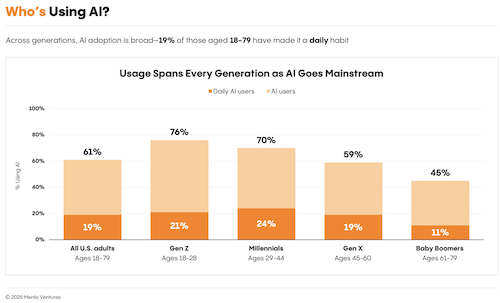
I'm not going to beat this drum more than you're already going to see online, but I'll share some interesting articles that share stats on the trends of AI that I've found interesting.
- National Institute: AI Stats/Trends
- 9 in 10 students want to learn more about AI in school.9
- More than half (54%) could tell the difference between human and AI-generated content.9
- About 2 out of 3 (67%) people would use ChatGPT instead of Google.9
- Menlo Ventures
- Stanford: 2025 AI Index
- "In 2023, the FDA approved 223 AI-enabled medical devices, up from just six in 2015."
- Buffer Blog: How AI gets more engagement on Social than real people
- 1.2M social posts across platforms with 15k posters using AI and non-AI posts, "...combining the data across all platforms, the median engagement rate for non-AI posts is 4.82 percent, while AI-assisted posts have a higher rate at 5.87 percent."
Summary
This project taught me that AI is harder to spot than ever before, and it's going to be even more ubiquitous overtime. I still feel like I have a pretty keen eye for it, but as I've started analyzing my own content and others I've realized that in some cases it's easier to guess than be completely objective about it; most of the time my project gives medium readings.
AI is a great tool, there is no doubt about it. I'll still use it for reviewing my emails when it's a tough conversation or my blog posts to make sure I'm not misspelling anything. While I don't like it building me complete projects, because reviewing thousands of lines of code is hard, I'll still have it helping me autocomplete my code and help me research.
At the end of the day, I’ll keep building tools like this not because I distrust AI, but because I care about keeping my own voice intact.